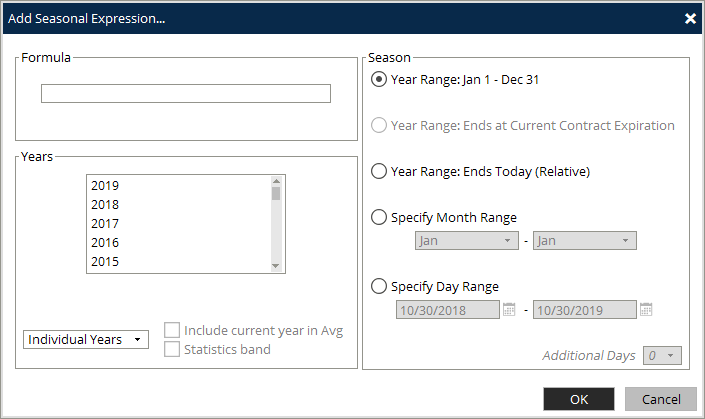
From the chart window context menu select Add | Add Seasonal Expression
|
Years |
Description |
|
Year |
Years to view chart history from |
|
Individual Years |
Only time series from the selected years will be displayed |
|
Statistics |
Only statistical overlays are plotted for selected years. Statistical overlays are 3 lines: |
|
Include current year in Avg |
When you include current year in your range, you can choose to optionally include those values in the average. This will only apply to average, not min or max. |
|
Statistics Band |
Display the statistics overlay as a band plot |
|
Both |
Individual years and statistics are displayed |
|
Formula |
Description |
|
Formula |
You can enter any valid formula. If you wish to use single root futures that auto roll you can use the FUT function. Example: FUT(SB,H) - Specifies a set of march sugar contract with no “period prior to expiration. |
|
Formula Input |
Input field for expression |
|
Season |
Description |
|
Year Range: Jan 1 - Dec 31 |
Season is Jan 1 thru Dec 31 |
|
Year Range: Ends at Current Contract Expiration |
Uses the Futures Contracts expiration date as the range end date. |
|
Year Range: Ends Today (Relative) |
Uses current day as the range end date |
|
Specify Month Range |
Specify a month range to chart. Month range may span Jan 1st, but is limited to 12 consecutive months |
|
Specify Day Range |
Specify a date range to chart. Day range may span Jan 1st, but is limited to 12 consecutive months |
|
Selected Only |
Only use the selected months in the curve |