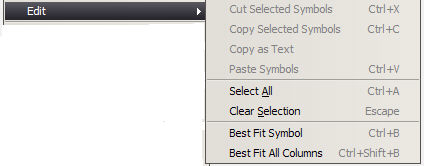
There are several items on the Watch List that can be changed or edited. To access the Edit option, go to the Watch List window. Right click in the Watch List or in the white space below the window. Click on the Edit option.
You can delete a symbol from the table by selecting the symbol on the Watch List, accessing the Edit option and clicking the Cut Selected Symbols option.
You can copy and paste a symbol by selecting the symbol on the Watch List, accessing the Edit option and selecting the Copy Selected Symbols option. Highlight the row where the copied symbol will reside. Click Paste Symbols. It is also possible to paste to a new Watch List.
It is also possible to Copy as Text, for purposes of pasting into email, text documents or other applications
To select all of the symbols in the table, click the Select All option.
To clear designated rows, select the rows and click Clear Selection.
If the Symbol column is not wide enough for the information, then click on Best Fit Sym. The column is adjusted.
If you want to readjust the width of all of the columns, click Best Fit All Columns.